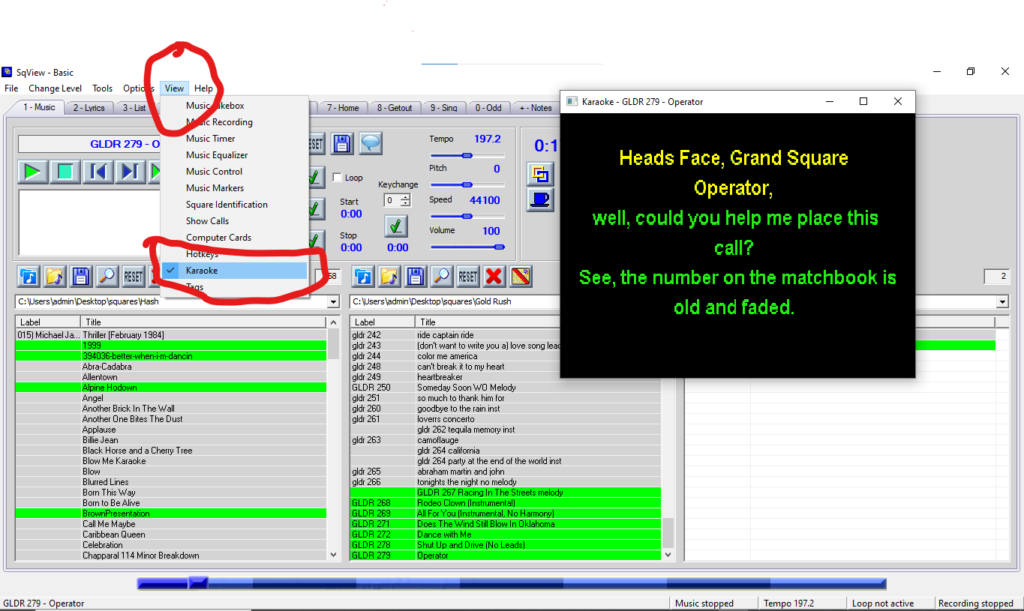
All Gold Rush Singing call downloads contain an instrumental .mp3 track and a corresponding .cdg file with the same name to activate the Squareview Karaoke Option. Below are the instructions for using this powerful feature.
To use the Gold Rush Karaoke Option in Squareview begin by locating the instrumental MP3 and it’s matching .cdg file in your download folder.
Copy both files into your Squareview singing call folder. Only one file will show in the window.
In the dropdown menu under view, click on Karaoke to open the Karaoke window.
After you open the Karaoke window click on the song to load it, and push play.
The lyrics will play on the Karaoke screen in time with the music.
Have Fun!
This feature is especially useful for viewing lyrics from a distance.